

Missing a single OSHA reporting deadline can cost your company up to $16,131 per violation, and repeat violations can reach $161,323. For safety managers in construction, healthcare, and logistics, the osha-compliant injury reporting process is not a back-office formality. It is a legal obligation with real financial and human consequences. Get it wrong and you face fines, failed audits, and workers who stop trusting the system. Get it right and you build a defensible record that protects both your people and your organization. This guide walks you through every step.
Table of Contents
- Understanding OSHA injury reporting requirements
- Preparing your OSHA-compliant reporting system
- Executing timely and accurate injury reporting
- Submitting injury data electronically through OSHA's ITA
- Common challenges and best practices for OSHA injury reporting
- Why common OSHA injury reporting approaches fall short — and what truly works
- Simplify and strengthen your OSHA injury reporting with Arkvos software
- Frequently asked questions
Key Takeaways
| Point | Details |
|---|---|
| Understanding recordability | Knowing OSHA’s criteria for recordable injuries ensures accurate reporting and compliance. |
| Timely reporting deadlines | Meeting 7-day recording and immediate severe injury reporting deadlines is essential to avoid penalties. |
| Electronic submission requirements | Certain employers must submit OSHA Forms 300A and 300/301 data electronically by March 2 yearly. |
| Employee involvement | Establish clear, non-retaliatory procedures for employees to report injuries promptly and accurately. |
| Use of technology | Integrating software tools can streamline OSHA injury reporting and enhance data accuracy. |
Understanding OSHA injury reporting requirements
Before you can build a working system, you need to know exactly what qualifies as a recordable case. OSHA defines recordable injuries and illnesses under 29 CFR Part 1904, and the criteria are more specific than most safety managers assume.
An injury or illness is recordable when it is work-related, represents a new case, and meets at least one of the general recording criteria. Those criteria include:
- Death
- Days away from work
- Restricted work or transfer to another job
- Medical treatment beyond first aid
- Loss of consciousness
- Diagnosis of a significant injury or illness by a healthcare professional
The phrase "beyond first aid" is where most teams stumble. Distinguishing medical treatment from first aid is central to recordability, and the line is not always obvious. Prescription medication, physical therapy, and sutures all count as medical treatment. Butterfly bandages, over-the-counter medication at nonprescription strength, and hot or cold therapy do not.
Work-relatedness is the other major determination. An injury is work-related if an event or exposure in the work environment caused or contributed to it, or significantly aggravated a pre-existing condition. Commuting to work is not covered. An injury that occurs during a work errand is.
Key rule: Employers must record each recordable case on OSHA Forms 300 and 301 within 7 calendar days of learning the case is recordable. The clock starts when you have enough information to make that determination, not when the injury occurred.
Getting this foundation right eliminates the most common source of recordkeeping errors before they start.
Preparing your OSHA-compliant reporting system
With a clear understanding of what to record, the next step is building the infrastructure to capture it consistently. This is where many organizations underinvest, and it shows during audits.
Required forms and posting obligations:
- OSHA Form 300: The injury and illness log, maintained at the establishment level
- OSHA Form 301: The incident report, completed for each recordable case
- OSHA Form 300A: The annual summary, which must be posted from February 1 through April 30 each year in a visible workplace location
All three forms must be retained for five years following the end of the calendar year they cover. That includes updating them if you receive new information.
Employee involvement is not optional. OSHA requires that employees have access to injury and illness records and must be able to report incidents without fear of retaliation. Your reporting procedures must be clearly communicated, easy to use, and non-punitive. If workers believe reporting an injury will cost them their job or a bonus, they will not report. That silence creates both a safety problem and a compliance liability.
| System element | Requirement | Common gap |
|---|---|---|
| OSHA Form 300 | Per-establishment log | Using one log for multiple sites |
| OSHA Form 301 | One per recordable case | Incomplete or delayed entries |
| OSHA Form 300A | Annual summary, posted Feb 1 to Apr 30 | Missed posting window |
| Record retention | 5 years | Purging records too early |
| Employee access | Must be provided upon request | No defined process for access |
Pro Tip: Designate a single person at each establishment as the recordkeeping owner. When everyone is responsible, no one is. One accountable person with a clear checklist catches gaps before they become violations.
Executing timely and accurate injury reporting
A well-designed system only works if the workflow is executed correctly under pressure. Here is how to manage the actual reporting process from incident to log entry.
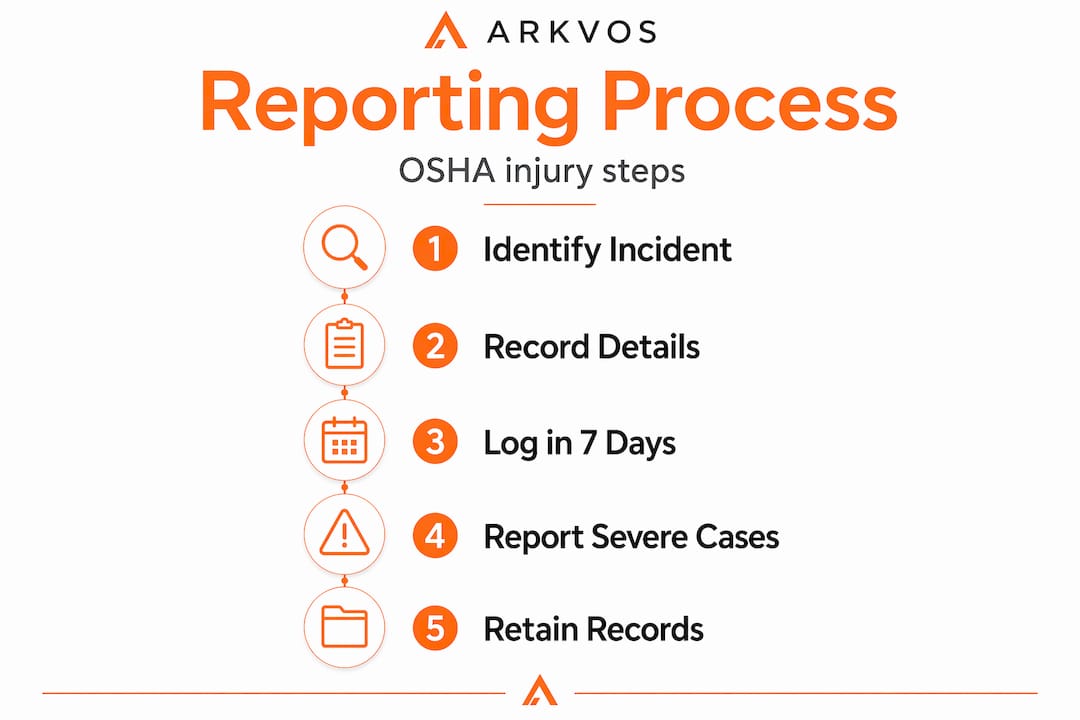
Step-by-step reporting workflow:
- Incident occurs. The injured worker or a witness notifies a supervisor immediately.
- First aid assessment. Determine whether the treatment required goes beyond first aid. Document everything, even if the case turns out to be non-recordable.
- Work-relatedness determination. Confirm the injury is connected to work activities or the work environment.
- Recordability decision. Apply OSHA's general recording criteria. If it qualifies, proceed.
- Complete OSHA Form 301. Fill out the incident report within 7 calendar days of learning the case is recordable.
- Enter on OSHA Form 300. Log the case on the establishment's injury and illness log within the same 7-day window.
- Assess for severe incident reporting. If the case involves a fatality, inpatient hospitalization, amputation, or eye loss, separate and faster reporting rules apply.
The severe incident rules are where the stakes jump significantly. Fatalities must be reported within 8 hours, and inpatient hospitalizations, amputations, or eye losses must be reported within 24 hours of the employer's knowledge of the event.
| Incident type | Reporting deadline | Method |
|---|---|---|
| Routine recordable case | 7 calendar days (log entry) | OSHA Forms 300 and 301 |
| Work-related fatality | 8 hours | Hotline, local office, or online |
| Hospitalization, amputation, eye loss | 24 hours | Hotline, local office, or online |

Severe injury and fatality reporting is mandatory regardless of whether your establishment is otherwise exempt from routine recordkeeping. That distinction catches employers off guard more often than it should.
Pro Tip: Set a calendar alert the moment a severe incident occurs. The 8-hour window for fatalities is shorter than most people realize once you factor in shift changes, supervisor notifications, and the time it takes to confirm facts.
Submitting injury data electronically through OSHA's ITA
Recording injuries on paper forms is only part of the compliance picture. Depending on your establishment's size and industry, you are also required to submit injury data electronically through OSHA's Injury Tracking Application (ITA).
Who must submit electronically:
- Establishments with 250 or more employees in industries not otherwise exempt must submit Form 300A data, and in some cases Forms 300 and 301 data
- Establishments with 20 to 249 employees in certain high-hazard industries must submit Form 300A data
- Eligibility is determined by size and industry using OSHA's ITA Coverage Application and flow chart
The annual deadline for electronic submission is March 2, covering data from the previous calendar year. Missing this deadline is a separate violation from failing to maintain records.
Three methods for submitting data:
- Web form (manual entry): Best for single establishments or small volumes. Enter data directly into the ITA portal.
- CSV batch upload: Useful for organizations managing multiple establishments. Requires a correctly formatted file.
- API submission: Designed for high-volume operations or software platforms that integrate directly with OSHA's system.
OSHA recommends the 300A web form for individual or small-volume submissions rather than CSV uploads, which introduce formatting errors.
| Submission method | Best for | Risk of error |
|---|---|---|
| Web form (manual) | Single or few establishments | Low, if data is prepared in advance |
| CSV batch upload | Multiple locations | Medium, formatting errors common |
| API integration | High-volume or software-driven | Low, if properly configured |
Data integrity practices that matter:
- Review Form 300A totals against your Form 300 log before submitting
- Remove employee names and personal identifiers from any data submitted electronically
- Save a copy of your submission confirmation as part of your audit record
Pro Tip: Do not wait until late February to begin your ITA submission. Pull your Form 300A data in January, reconcile it against your logs, and submit early. The ITA portal experiences high traffic near the March 2 deadline.
Common challenges and best practices for OSHA injury reporting
Even organizations with strong intentions make consistent errors in their occupational safety reporting. Knowing where the gaps typically appear helps you close them before an inspector does.
The most frequent problems:
- Company-wide aggregation instead of establishment-level logs. OSHA recordkeeping is establishment-specific. A construction company with five active job sites needs five separate Form 300 logs, not one combined record.
- Delayed notification chains. The 8-hour and 24-hour severe incident windows start when the employer gains knowledge, not when the injury is officially documented. If a supervisor knew about a hospitalization at 7 a.m. but did not tell the safety manager until noon, the clock started at 7 a.m.
- Inconsistent classification across locations. Without a centralized process, two supervisors at two different sites will make different recordability decisions for nearly identical incidents.
- Failure to update logs. If a worker initially treated with first aid later requires surgery, the case becomes recordable. Employers must update OSHA 300 Logs when new information changes the classification.
The core principle: Compliance depends on knowing when the employer becomes aware of a reportable incident and having consistent processes across every location. The word "employer" in OSHA regulations means any supervisor or manager with authority, not just the safety director.
Pro Tip: Build a "knowledge trigger" protocol into your incident notification chain. Every supervisor should know that the moment they learn of a potential severe incident, they must notify the safety manager immediately, regardless of shift or time of day. Document that notification with a timestamp.
Why common OSHA injury reporting approaches fall short — and what truly works
Most organizations treat the safety incident reporting process as a compliance task. Fill out the form, meet the deadline, move on. That mindset is exactly why so many companies end up with recordkeeping violations they never saw coming.
Here is what we have observed across high-risk industries: the organizations with the fewest OSHA recordkeeping problems are not the ones with the most complex systems. They are the ones where frontline workers genuinely believe that reporting an injury will help them, not hurt them. That cultural reality shapes data quality more than any form or software ever will.
The second failure pattern is treating injury reporting as a standalone activity. When your employee injury logging system does not connect to your incident investigation workflow, you end up with accurate records of what happened but no mechanism to prevent it from happening again. The report becomes a filing exercise. The safety outcome never improves.
Integrating electronic reporting tools directly with your incident management workflow changes this. When a worker checks in, when a safety briefing is verified, when an incident is logged, all of that data should live in one place and feed into your compliance reporting automatically. That is not a luxury for large organizations. It is the only way to maintain a defensible single source of truth across multiple locations without relying on individual supervisors to do everything perfectly.
The most underrated practice in workplace accident documentation is making it easy for workers to report minor incidents before they become recordable ones. Near-miss reporting, when it is genuinely encouraged and acted on, is the leading indicator that your safety culture is working. Organizations that only count recordable injuries are measuring outcomes. Organizations that track near-misses are managing risk.
Simplify and strengthen your OSHA injury reporting with Arkvos software
Building a consistent, audit-ready injury reporting process across multiple sites is genuinely hard without the right infrastructure behind it.

Arkvos is built specifically for construction, healthcare, and logistics teams that need verifiable, OSHA-ready records without the administrative burden. When a worker scans a QR code on-site, Arkvos logs a photo, GPS location, and timestamp, creating a tamper-proof attendance and safety verification record. The platform's audit vault and exportable PDF reports are designed to support your compliance documentation from the moment an incident occurs through the ITA submission deadline. If you manage industry-specific compliance across multiple locations, Arkvos gives every establishment its own defensible record. Explore the injury reporting verification tools to see how automated check-ins and real-time dashboards can close the gaps in your current process.
Frequently asked questions
When must an employer record an injury on the OSHA 300 Log?
Employers must record injuries that are work-related, represent new cases, and meet general recording criteria within 7 calendar days of learning the case qualifies. The clock starts at the point of knowledge, not the date of injury.
What are the deadlines for reporting work-related fatalities and severe injuries to OSHA?
Fatalities must be reported within 8 hours, and work-related inpatient hospitalizations, amputations, or eye losses must be reported within 24 hours of the employer's knowledge of the event. These deadlines apply even to establishments otherwise exempt from routine recordkeeping.
Who is required to submit OSHA Form 300A electronically?
Establishments with 250 or more employees in non-exempt industries and establishments with 20 to 249 employees in certain high-hazard industries must submit Form 300A electronically by March 2 each year. Use OSHA's ITA Coverage Application to confirm your establishment's specific obligation.
How long must OSHA injury and illness records be kept?
Employers must retain OSHA Forms 300, 301, and 300A for five years following the end of the calendar year they cover, updating entries whenever new information changes a prior classification.
What are the best ways to report severe injuries or fatalities to OSHA?
Severe injuries and fatalities can be reported via OSHA's hotline, by contacting the nearest OSHA area office, or through OSHA's online reporting portal. All three methods are accepted, and the choice should be based on whichever gets you within the required deadline fastest.
Recommended
- Arkvos — Worker Safety Briefing Verification Software — OSHA Compliance — US and Canada
- Arkvos — Worker Safety Briefing Verification Software — OSHA Compliance — US and Canada
- Arkvos — Worker Safety Briefing Verification Software — OSHA Compliance — US and Canada
- Arkvos — Worker Safety Briefing Verification Software — OSHA Compliance — US and Canada